예제 프로젝트 구성
예제를 위한 프로젝트는 ex02 이름으로 생성하고
Spring Legacy Project로 생성한다.
프로젝트 생성한 후에는 pom.xml의 수정,데이터베이스 관련 처리,스프링 MVC 처리와 같은 순서로 진행한다.
pom.xml
<?xml version="1.0" encoding="UTF-8"?>
<project xmlns="http://maven.apache.org/POM/4.0.0"
         xmlns:xsi="http://www.w3.org/2001/XMLSchema-instance"
         xsi:schemaLocation="http://maven.apache.org/POM/4.0.0 http://maven.apache.org/xsd/maven-4.0.0.xsd">
    <modelVersion>4.0.0</modelVersion>

    <groupId>com.osk2090</groupId>
    <artifactId>controller</artifactId>
    <name>ex02</name>
    <packaging>war</packaging>
    <version>1.0-SNAPSHOT</version>

    <properties>
        <java-version>11</java-version>
        <org.springframework-version>5.0.7.RELEASE</org.springframework-version>
        <org.aspectj-version>1.6.10</org.aspectj-version>
        <org.slf4j-version>1.6.6</org.slf4j-version>
    </properties>

    <dependencies>
        <!-- Spring -->
        <dependency>
            <groupId>org.springframework</groupId>
            <artifactId>spring-context</artifactId>
            <version>${org.springframework-version}</version>
            <exclusions>
                <!-- Exclude Commons Logging in favor of SLF4j -->
                <exclusion>
                    <groupId>commons-logging</groupId>
                    <artifactId>commons-logging</artifactId>
                </exclusion>
            </exclusions>
        </dependency>

        <dependency>
            <groupId>org.springframework</groupId>
            <artifactId>spring-test</artifactId>
            <version>5.0.7.RELEASE</version>
        </dependency>

        <dependency>
            <groupId>org.springframework</groupId>
            <artifactId>spring-jdbc</artifactId>
            <version>5.0.7.RELEASE</version>
        </dependency>

        <dependency>
            <groupId>org.springframework</groupId>
            <artifactId>spring-tx</artifactId>
            <version>5.0.7.RELEASE</version>
        </dependency>

        <dependency>
            <groupId>com.zaxxer</groupId>
            <artifactId>HikariCP</artifactId>
            <version>4.0.3</version>
        </dependency>

        <dependency>
            <groupId>org.mybatis</groupId>
            <artifactId>mybatis</artifactId>
            <version>3.5.7</version>
        </dependency>

        <dependency>
            <groupId>org.mybatis</groupId>
            <artifactId>mybatis-spring</artifactId>
            <version>2.0.6</version>
        </dependency>

        <dependency>
            <groupId>org.bgee.log4jdbc-log4j2</groupId>
            <artifactId>log4jdbc-log4j2-jdbc4</artifactId>
            <version>1.16</version>
        </dependency>

        <dependency>
            <groupId>junit</groupId>
            <artifactId>junit</artifactId>
            <version>4.7</version>
            <scope>test</scope>
        </dependency>

        <dependency>
            <groupId>org.projectlombok</groupId>
            <artifactId>lombok</artifactId>
            <version>1.18.20</version>
            <scope>provided</scope>
        </dependency>

        <dependency>
            <groupId>javax.servlet</groupId>
            <artifactId>javax.servlet-api</artifactId>
            <version>3.1.0</version>
            <scope>provided</scope>
        </dependency>

    </dependencies>

    <build>
        <plugins>
            <plugin>
                <artifactId>maven-eclipse-plugin</artifactId>
                <version>2.9</version>
                <configuration>
                    <additionalProjectnatures>
                        <projectnature>org.springframework.ide.eclipse.core.springnature</projectnature>
                    </additionalProjectnatures>
                    <additionalBuildcommands>
                        <buildcommand>org.springframework.ide.eclipse.core.springbuilder</buildcommand>
                    </additionalBuildcommands>
                    <downloadSources>true</downloadSources>
                    <downloadJavadocs>true</downloadJavadocs>
                </configuration>
            </plugin>
            <plugin>
                <groupId>org.apache.maven.plugins</groupId>
                <artifactId>maven-compiler-plugin</artifactId>
                <version>2.5.1</version>
                <configuration>
                    <source>11</source>
                    <target>11</target>
                    <compilerArgument>-Xlint:all</compilerArgument>
                    <showWarnings>true</showWarnings>
                    <showDeprecation>true</showDeprecation>
                </configuration>
            </plugin>
            <plugin>
                <groupId>org.codehaus.mojo</groupId>
                <artifactId>exec-maven-plugin</artifactId>
                <version>1.2.1</version>
                <configuration>
                    <mainClass>org.test.int1.Main</mainClass>
                </configuration>
            </plugin>

            <!--java설정시 web.xml이 없다는 설정 추가-->
            <plugin>
                <groupId>org.apache.maven.plugins</groupId>
                <artifactId>maven-war-plugin</artifactId>
                <version>3.2.0</version>
                <configuration>
                    <failOnMissingWebXml>false</failOnMissingWebXml>
                </configuration>
            </plugin>
        </plugins>
    </build>
</project>
테이블 생성과 Dummy(더미) 데이터 생성
SQL Developer를 이용해서 앞에서 작성한 book_ex 계정을 통해서 테이블을 생성한다.
게시물은 각 게시물마다 고유의 번호가 필요하다.오라클의 경우 시퀀스를 이용해서 이러한 작업을 처리한다.
create sequence seq_board;

create table tbl_board (
bno number(10,0),
title varchar2(200) not null,
content varchar2(2000) not null,
writer varchar2(50) not null,
regdate date default sysdate,
updatedate date default sysdate
);

alter table tbl_board add constraint pk_board
primary key(bno);
시퀀스를 생성할 때는 데이터베이스의 다른 오브젝트들과 구분하기 위해서
seq_와 같이 시작하는 것이 일반적이다.
테이블을 생성할 때는 tbl_로 시작하거나 t_와 같이 구분이 가능한 단어를 앞에 붙어주는 것이 좋다.
tbl_board 테이블은 고유의 번호를 가지기 위해서 bno 칼럼을 지정했고 제목(title),내용(content),작성자(writer)를
칼럼으로 지정한다.테이블을 설계할때는 가능하면 레코드의 생성 시간과 최종 수정 시간을 같이 기록하는 것이 좋기 때문에 생성 시간(sysdate)과 레코드의 최종 수정 시간(uopdatedate)칼럼을 작성한다.
이때 기본값으로 sysdate를 지정해서 레코드가 생성된 시간은 자동으로 기록될 수 있게 한다.
테이블의 생성 이후에는 alter table을 이용해서 테이블에 Primaey Key(이하 PJ)를 지정해 주었다.
PK를 지정할 때 pk_board 라는 이름을 부여하는데,이 이름은 뒤에서 중요하게 사용되므로 반드시 의미를 구분할 수 있게 생성해 주는 것이 좋다.
더미 데이터의 추가
테이블을 생성하고 나면 여러 개의 데이터를 추가해 주는데 이런 의미없는 데이터를 흔히 토이 데이터 혹은 더미 데이터라고 한다.게시물이 많을수록 유용할 수 있지만 간단하게 다음과 같은 방식을 이용해서 더미 데이터를 추가한다.
insert into tbl_board (bno, title, content, writer)
values (seq_board.nextval, '테스트 제목','테스트 내용','user00');
tbl_board의 bno 칼럼은 매번 새로은 값이 들어가야 하므로 seq_board.nextval을 이용해서 매번 새로은 번호를 얻는다.
regdate와 updatedate 칼럼은 기본으로 현재 시간이 들어가므로,변로듸 작업이 필요하지 않는다.
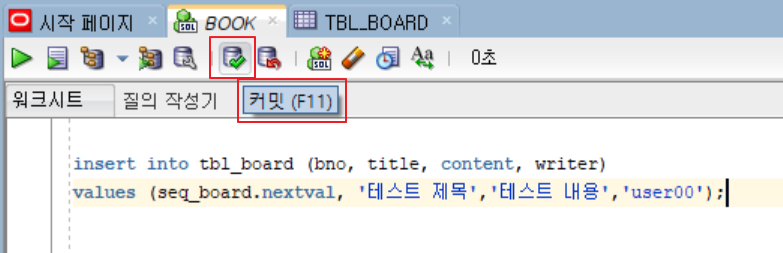
오라클 데이터 베이스의 경우 데이터를 insert한 후 주의해야 하는 점이 commit이다.
MySQL과 달리 오라클의 경우에는 데이터에 대한 가공 작업 후 반드시 COMMIT을 수동으로 처리해야 한다.
명령어를 이용해서 commit을 해 주거나 화면 위쪽에 있는 버튼을 이용해서 처리할 수 있다.
명령어를 이용해서 commit을 해 주거나 화면 위쪽에 있는 버튼을 이용해서 처리할 수 있다.
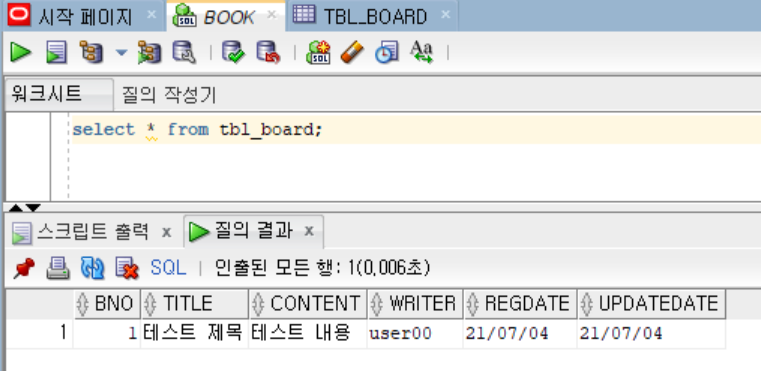
insert를 여러 번 실행한 후에는 select문을 이용해서 데이터가 정상적으로 처리되었는지 확인해 주는 것이 좋다.
데이터베이스에 insert 작업이 끝난 후에는 반드시 데이터베이스를 commit 해야 한다.
오라클의 경우 MySQL과 다르기 때문에 수동으로 처리해야 하므로 주의가 필요하다.
Java 설정을 이용하는 경우의 프로젝트 구성
Java 설정을 이용한다면 pom.xml의 라이브러리 추가는 동일하지만 XML을 대신하는 클래스 파일이 필요하다.
jex02 프로젝트를 작성했다면 프로젝트 생성 시 만들어진 XML 파일들을 삭제하고 com.osk2090.config 패키지를 생성한다.
Java 설정을 이용하는 경우에는 pom.xml에 web.xml을 사용하지 않는 설정이 추가된다.
pom.xml내에
<?xml version="1.0" encoding="UTF-8"?>
<project xmlns="http://maven.apache.org/POM/4.0.0"
         xmlns:xsi="http://www.w3.org/2001/XMLSchema-instance"
         xsi:schemaLocation="http://maven.apache.org/POM/4.0.0 http://maven.apache.org/xsd/maven-4.0.0.xsd">
    <modelVersion>4.0.0</modelVersion>

    <groupId>com.osk2090</groupId>
    <artifactId>controller</artifactId>
    <name>jex02</name>
    <packaging>war</packaging>
    <version>1.0-SNAPSHOT</version>

    <properties>
        <java-version>11</java-version>
        <org.springframework-version>5.0.7.RELEASE</org.springframework-version>
        <org.aspectj-version>1.6.10</org.aspectj-version>
        <org.slf4j-version>1.6.6</org.slf4j-version>
    </properties>

    <dependencies>
        <!-- Spring -->
        <dependency>
            <groupId>org.springframework</groupId>
            <artifactId>spring-context</artifactId>
            <version>${org.springframework-version}</version>
            <exclusions>
                <!-- Exclude Commons Logging in favor of SLF4j -->
                <exclusion>
                    <groupId>commons-logging</groupId>
                    <artifactId>commons-logging</artifactId>
                </exclusion>
            </exclusions>
        </dependency>

        <dependency>
            <groupId>org.springframework</groupId>
            <artifactId>spring-webmvc</artifactId>
            <version>${org.springframework-version}</version>
        </dependency>

        <dependency>
            <groupId>org.springframework</groupId>
            <artifactId>spring-test</artifactId>
            <version>5.0.7.RELEASE</version>
        </dependency>

        <dependency>
            <groupId>org.springframework</groupId>
            <artifactId>spring-jdbc</artifactId>
            <version>5.0.7.RELEASE</version>
        </dependency>

        <dependency>
            <groupId>org.springframework</groupId>
            <artifactId>spring-tx</artifactId>
            <version>5.0.7.RELEASE</version>
        </dependency>

        <dependency>
            <groupId>com.zaxxer</groupId>
            <artifactId>HikariCP</artifactId>
            <version>4.0.3</version>
        </dependency>

        <dependency>
            <groupId>org.mybatis</groupId>
            <artifactId>mybatis</artifactId>
            <version>3.5.7</version>
        </dependency>

        <dependency>
            <groupId>org.mybatis</groupId>
            <artifactId>mybatis-spring</artifactId>
            <version>2.0.6</version>
        </dependency>

        <dependency>
            <groupId>org.bgee.log4jdbc-log4j2</groupId>
            <artifactId>log4jdbc-log4j2-jdbc4</artifactId>
            <version>1.16</version>
        </dependency>

        <dependency>
            <groupId>junit</groupId>
            <artifactId>junit</artifactId>
            <version>4.7</version>
            <scope>test</scope>
        </dependency>

        <dependency>
            <groupId>org.projectlombok</groupId>
            <artifactId>lombok</artifactId>
            <version>1.18.20</version>
            <scope>provided</scope>
        </dependency>

        <dependency>
            <groupId>javax.servlet</groupId>
            <artifactId>servlet-api</artifactId>
            <version>2.5</version>
            <scope>provided</scope>
        </dependency>
        <dependency>
            <groupId>javax.servlet</groupId>
            <artifactId>javax.servlet-api</artifactId>
            <version>3.1.0</version>
            <scope>provided</scope>
        </dependency>
        <dependency>
            <groupId>javax.servlet.jsp</groupId>
            <artifactId>jsp-api</artifactId>
            <version>2.1</version>
            <scope>provided</scope>
        </dependency>
        <dependency>
            <groupId>javax.servlet</groupId>
            <artifactId>jstl</artifactId>
            <version>1.2</version>
        </dependency>

        <dependency>
            <groupId>junit</groupId>
            <artifactId>junit</artifactId>
            <version>4.7</version>
            <scope>test</scope>
        </dependency>

    </dependencies>

    <build>
        <plugins>
            <plugin>
                <artifactId>maven-eclipse-plugin</artifactId>
                <version>2.9</version>
                <configuration>
                    <additionalProjectnatures>
                        <projectnature>org.springframework.ide.eclipse.core.springnature</projectnature>
                    </additionalProjectnatures>
                    <additionalBuildcommands>
                        <buildcommand>org.springframework.ide.eclipse.core.springbuilder</buildcommand>
                    </additionalBuildcommands>
                    <downloadSources>true</downloadSources>
                    <downloadJavadocs>true</downloadJavadocs>
                </configuration>
            </plugin>
            <plugin>
                <groupId>org.apache.maven.plugins</groupId>
                <artifactId>maven-compiler-plugin</artifactId>
                <version>2.5.1</version>
                <configuration>
                    <source>11</source>
                    <target>11</target>
                    <compilerArgument>-Xlint:all</compilerArgument>
                    <showWarnings>true</showWarnings>
                    <showDeprecation>true</showDeprecation>
                </configuration>
            </plugin>
            <plugin>
                <groupId>org.codehaus.mojo</groupId>
                <artifactId>exec-maven-plugin</artifactId>
                <version>1.2.1</version>
                <configuration>
                    <mainClass>org.test.int1.Main</mainClass>
                </configuration>
            </plugin>

            <!--java설정시 web.xml이 없다는 설정 추가-->
            <plugin>
                <groupId>org.apache.maven.plugins</groupId>
                <artifactId>maven-war-plugin</artifactId>
                <version>3.2.0</version>
                <configuration>
                    <failOnMissingWebXml>false</failOnMissingWebXml>
                </configuration>
            </plugin>
        </plugins>
    </build>
</project>
com.osk2090.config 폴더에는 web.xml을 대신하는 WebConfig 클래스,root-context.xml을 대신하는 RootConfig 클래스,
servlet_context.xml을 대신하는 ServletConfig 클래스를 작성한다.
RootConfig.class
@Configuration
@MapperScan(basePackages = {"com.osk2090.mapper"})
public class RootConfig {

    @Bean
    public DataSource dataSource() {
        HikariConfig hikariConfig = new HikariConfig();
        hikariConfig.setDriverClassName("net.sf.log4jdbc.sql.jdbcapi.DriverSpy");
        hikariConfig.setJdbcUrl("jdbc:log4jdbc:oracle:thin@localhost:1521:XE");

        hikariConfig.setUsername("book_ex");
        hikariConfig.setPassword("book_ex");

        HikariDataSource dataSource = new HikariDataSource(hikariConfig);

        return dataSource;
    }

    @Bean
    public SqlSessionFactory sqlSessionFactory()throws Exception {
        SqlSessionFactoryBean sqlSessionFactory = new SqlSessionFactoryBean();
        sqlSessionFactory.setDataSource(dataSource());
        return sqlSessionFactory.getObject();
    }
}
ServletConfig.class
@EnableWebMvc
@ComponentScan(basePackages = {"com.osk2090.controller"})
public class ServletConfig implements WebMvcConfigurer {
    @Override
    public void configureViewResolvers(ViewResolverRegistry registry) {
        InternalResourceViewResolver bean = new InternalResourceViewResolver();
        bean.setViewClass(JstlView.class);
        bean.setPrefix("/WEB-INF/views/");
        bean.setSuffix(".jsp");
        registry.viewResolver(bean);
    }

    @Override
    public void addResourceHandlers(ResourceHandlerRegistry registry) {
        registry.addResourceHandler("/resources/**").
                addResourceLocations("/resources/");
    }
}
WebConfig.class
public class WebConfig extends AbstractAnnotationConfigDispatcherServletInitializer {
    @Override
    protected Class<?>[] getRootConfigClasses() {
        return new Class[]{RootConfig.class};
    }

    @Override
    protected Class<?>[] getServletConfigClasses() {
        return new Class[]{ServletConfig.class};
    }

    @Override
    protected String[] getServletMappings() {
        return new String[]{"/"};
    }

    @Override
    protected void customizeRegistration(ServletRegistration.Dynamic registration) {
        registration.setInitParameter("throwExceptionIfNoHandler", "true");
    }
}
위의 작업 후에는 Oracle JDBC Driver의 설정과,log4jdbc.log4j2.properties 등을 추가합니다.
프로젝트의 구성 후에는 테스트 코드를 통해서 정상적인지 확인하고 Tomcat을 통해서 실행 가능한지 확인해야 한다.